mirror of
https://github.com/jackyzha0/quartz.git
synced 2025-12-25 13:54:05 -06:00

46 lines
3.0 KiB
Markdown
46 lines
3.0 KiB
Markdown
---
|
|
title: Stream Deck
|
|
---
|
|
|
|
## What is StreamDeck?
|
|
Elgato StreamDeck is a kind of auxiliary keyboard, on the keys of which you can display any graphics, including dynamic ones (automatic replacement of photo and description).
|
|
|
|
In addition, the keys can change depending on the context (e.g., an open program) and act as folders inside which we have additional buttons.
|
|
|
|
It is designed for streamers but is also great for professional programs that require access to multiple options and, of course, [[Optimization/Automation/Automation]].
|
|
|
|
## How do I use StreamDeck?
|
|
As of July 2021, I am using [Elgato StreamDeck](https://www.elgato.com/en/stream-deck) as an additional keyboard, used for automation and easy control of macros defined in [[Optimization/Tools/Keyboard Maestro]]
|
|
|
|
I have StreamDeck version XL and additionally use the ability to define folders.
|
|
|
|
**Mostly with its help I launch the:**
|
|
- launching groups of notes in [[Optimization/Tools/Obsidian]] / [[Optimization/Tools/Notion]]
|
|
- launching databases from [[Optimization/Tools/Airtable]]
|
|
- running the web pages I open frequently (and not only)
|
|
- music control, including throughout the house
|
|
- switching contexts between projects (workflow automation)
|
|
|
|
## Automations
|
|
I enjoy discovering new ways to use StreamDeck. Seemingly, it is just an unusual keyboard and in practice it offers very great possibilities.
|
|
|
|
### Modes of operation
|
|
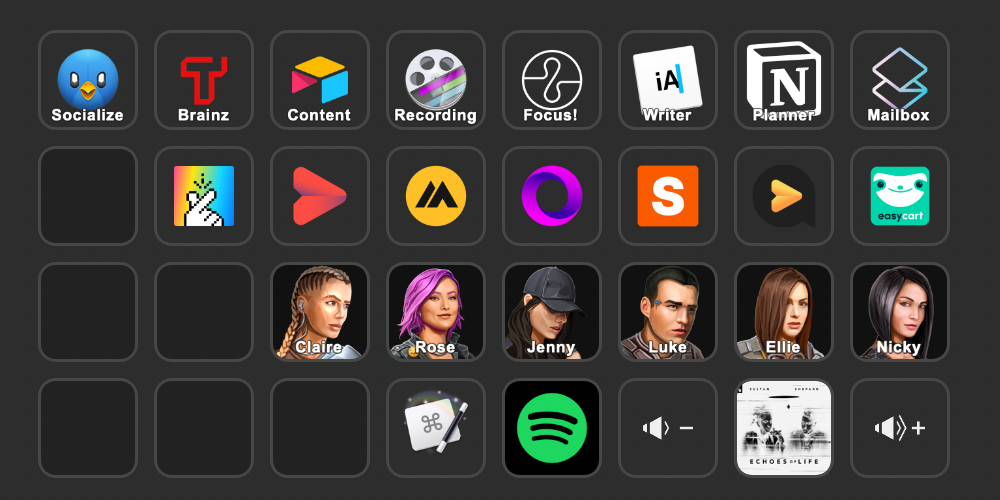
When working, it takes the most time and energy to change the context. I've set up buttons on the main screen linked to activities I want to do regularly. By linking actions to [[Optimization/Tools/Keyboard Maestro]], I can switch between projects and tasks with a single button.
|
|
|
|
**Examples:**
|
|
- Activate email reply mode (loose music, no DND and activation of Superhuman and browser)
|
|
- The projects I am involved in are folders inside of which there are actions related to them (such as writing articles for the easycart blog or creating podcast scripts for automated)
|
|
- switching between operating modes (focused / loose)
|
|
- signaling that recording is on
|
|
|
|
### Activating bots
|
|
I categorize my [[Optimization/Automation/Automation]] by bot avatars that perform specific tasks for me. Their scenarios are designed in such a way that they can be combined with each other or called separately.
|
|
|
|
|
|
|
|
### Additional observations
|
|
Stream Deck works best in conjunction with [[Optimization/Tools/Keyboard Maestro]], as this allows us to assign any macro to a button.
|
|
|
|
At the same time, this makes setting up a Stream Deck technically and conceptually challenging, as preparing actually useful macros is not obvious.
|
|
|
|
The most important benefit of SD is that you can use it to activate various system functions faster. The downside is that not having access to it (e.g., on a trip with a laptop) disrupts your entire workflow. As a result, I use [[Optimization/Tools/Raycast]] or [[Projects/Design Maestro]] more and more often than Stream Deck. |